
LucaFX
Adobe After Effects CEP Extension6 Integrated PanelsAE CC 2019 – 2026+

LucaFX Extension for After Effects

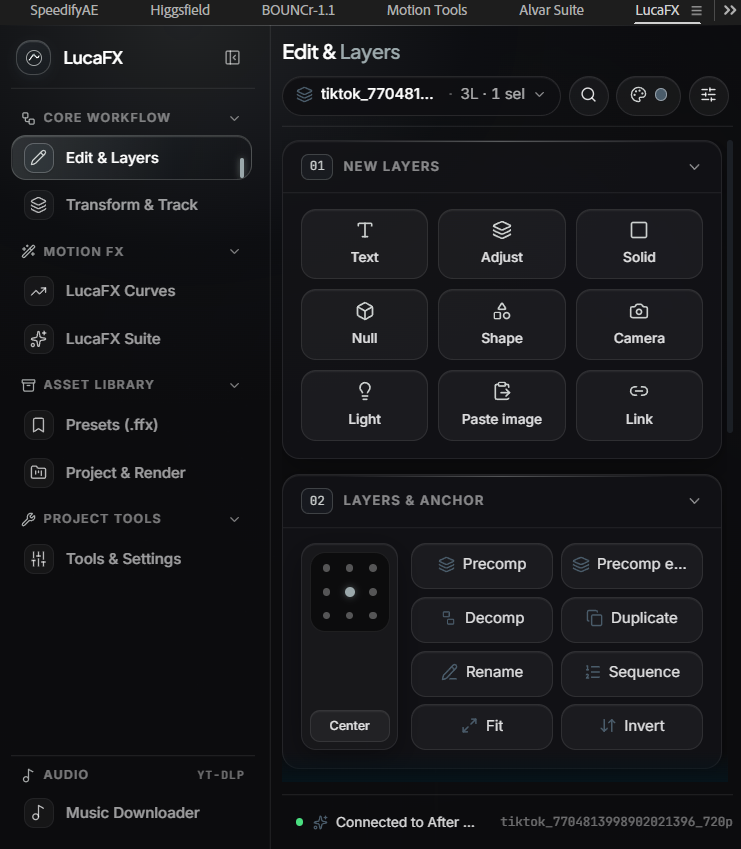
A dockable motion workflow panel built directly inside After Effects — combining instant layer & anchor controls, a visual Bezier curve editor, 60fps live-previewed presets, and one-tap workflow actions without leaving your comp.

Native ExtendScript host bridge + dockable CEP panel
Dedicated packages for AE 2023+ and AE 2022 & below

Version-Specific Downloads · Windows CEP Package

Choose Your After Effects Version

Download the package matched to your Adobe After Effects release. Select your AE version to highlight the matching installer, or download directly below.

Your After Effects version:
Recommended for AE 2025Google Drive

LucaFX Extension

For After Effects 2023 and above

Google Drive FolderCSXS 11 – CSXS 15
  • Tuned for modern Chromium CEP runtimes in AE 2023 and newer
  • Includes 1-click Windows installer (Install_LucaFX_Windows.bat)
  • Full panel suite: Edit & Layers, Transform, Curves, Suite & Quick Actions
Download LucaFX Extension

For After Effects 2023 and above

AE CC 2019 · 2020 · 2021 · 2022Google Drive

LucaFX Extension (1)

For After Effects 2022 and below

Google Drive FolderCSXS 9 – CSXS 11
  • Legacy CEP bundle structured for After Effects 2022 and earlier
  • Includes PlayerDebugMode registry helper & 1-click .bat setup
  • Identical workflow panels, curve presets & ExtendScript host engine
Download LucaFX Extension (1)

For After Effects 2022 and below

1-Click Windows Installation

No administrator permissions required. Takes under 15 seconds.

Step 01

Download from Google Drive & Extract

Pick the Google Drive folder matching your After Effects version, click Download all, then extract the downloaded ZIP into a normal folder before running anything.

Step 02

Run 1-Click Installer

Double-click Install_LucaFX_Windows.bat (no Admin required). It automatically enables Adobe CEP PlayerDebugMode for CSXS 9–15 and copies com.luxafx.studio into %APPDATA%\Adobe\CEP\extensions.

Install_LucaFX_Windows.bat
Step 03

Open & Dock Inside After Effects

Restart Adobe After Effects completely, then open Window → Extensions → LucaFX and drag the panel tab into your preferred workspace column.

Window → Extensions → LucaFX
REC TIME00:00:00:00/00:00:60:00

Your next edit starts here.

Grab the 31 free CCs, prep your export in the TikTok Patcher, or subscribe for weekly unreleased curves.